React
[React] 실습 : 섭씨온도, 화씨온도 표시하기
MY_STUDY
2024. 8. 19. 08:45
지난 포스팅에서 Shared State를 배우기 위해 섭씨온도, 화씨온도 변환하는 것을 배웠는데, 직접 실습을 통해 확인해볼 것
const scaleNames = {
    c: "섭씨",
    f: "화씨",
};

function TemperatureInput(props) {
    const handleChange = (event) => {
        props.onTemperatureChange(event.target.value);
    };

    return (
        <fieldset>
            <legend>
                온도를 입력해주세요(단위:{scaleNames[props.scale]}):
            </legend>
            <input value={props.temperature} onChange={handleChange} />
        </fieldset>
    );
}

export default TemperatureInput;
일단 하위 컴포넌트인 TemperatureInput 컴포넌트 작성
import React, { useState } from "react";
import TemperatureInput from "./TemperatureInput";

function BoilingVerdict(props) {
    if (props.celsius >= 100) {
        return <p>물이 끓습니다.</p>;
    }
    return <p>물이 끓지 않습니다.</p>;
}

function toCelsius(fahrenheit) {
    return ((fahrenheit - 32) * 5) / 9;
}

function toFahrenheit(celsius) {
    return (celsius * 9) / 5 + 32;
}

function tryConvert(temperature, convert) {
    const input = parseFloat(temperature);
    if (Number.isNaN(input)) {
        return "";
    }
    const output = convert(input);
    const rounded = Math.round(output * 1000) / 1000;
    return rounded.toString();
}

function Calculator(props) {
    const [temperature, setTemperature] = useState("");
    const [scale, setScale] = useState("c");

    const handleCelsiusChange = (temperature) => {
        setTemperature(temperature);
        setScale("c");
    };

    const handleFahrenheitChange = (temperature) => {
        setTemperature(temperature);
        setScale("f");
    };

    const celsius =
        scale === "f" ? tryConvert(temperature, toCelsius) : temperature;
    const fahrenheit =
        scale === "c" ? tryConvert(temperature, toFahrenheit) : temperature;

    return(
        <div>
            <TemperatureInput
                scale="c"
                temperature={celsius}
                onTemperatureChange={handleCelsiusChange}
            />
            <TemperatureInput
                scale="f"
                temperature={fahrenheit}
                onTemperatureChange={handleFahrenheitChange}
            />
            <BoilingVerdict celsius={parseFloat(celsius)} />
        </div>
    );
}

export default Calculator;
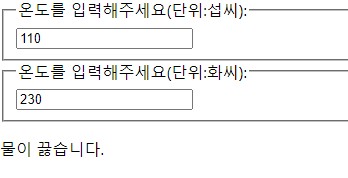
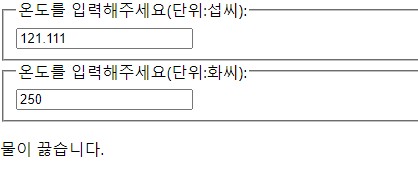
상위 컴포넌트 Calculator에서 하위 컴포넌트 TemperatureInput 으로 정보를 전송하여 입력 후 온도 변환값이 나타나게 한다.
import React from 'react';
import ReactDOM from 'react-dom';
import './index.css';
import App from './App';
import reportWebVitals from './reportWebVitals';

import Calculator from './chapter_12/Calculator';

ReactDOM.render(
  <React.StrictMode>
  <Calculator />
  </React.StrictMode>,
  document.getElementById('root')
);

// If you want to start measuring performance in your app, pass a function
// to log results (for example: reportWebVitals(console.log))
// or send to an analytics endpoint. Learn more: https://bit.ly/CRA-vitals
reportWebVitals();
터미널에서 npm start로 실행해본다.